The blocking problem in AI-assisted development is underrated. You're mid-thought, you ask the assistant to generate a test suite or rewrite a module, and then you sit there watching tokens arrive for two minutes. When it finishes, your mental context has half-evaporated. You've lost more than time — you've lost the thread.
The instinctive fix is to open another tab, start another session, and do something else while the first task runs. That works, but it's friction. You're now context-switching between sessions manually, tracking state in your head, and merging outputs yourself. The assistant is doing asynchronous work through a synchronous interface.
The pattern I landed on is simpler: give the AI a task queue as an MCP tool. It submits work, gets a task ID back immediately, carries on with whatever it was doing. A local worker pool drains the queue in the background and writes results directly to the workspace. No polling, no manual merging — the files just appear.
The queue model
The core idea is a SQLite-backed priority queue exposed as an MCP server.
The AI interacts with it through typed tool calls — submit_task,
get_task, list_tasks, retry_failed —
over the standard MCP stdio transport. From the AI's perspective, it's just tools.
The queue mechanics are entirely internal.
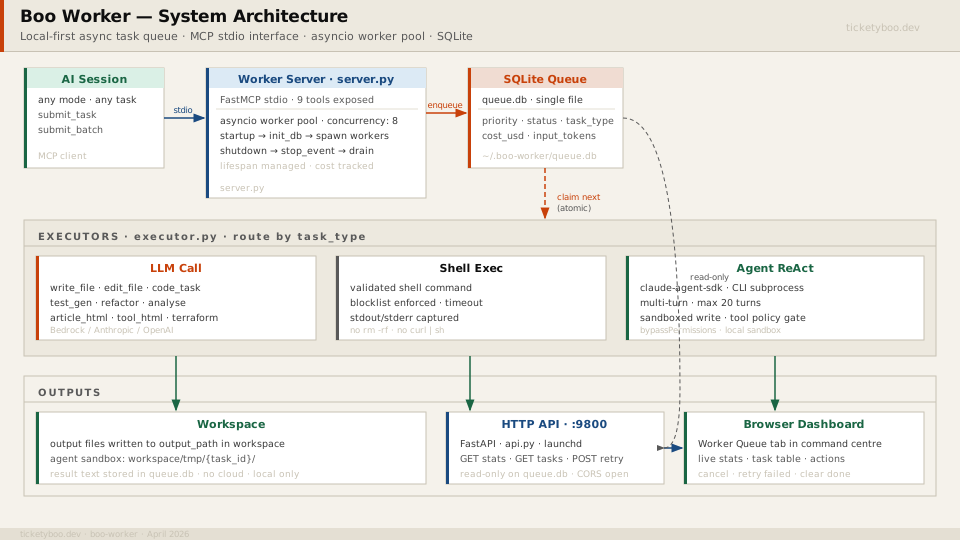
Tasks have a type — write_file, code_task, shell,
test_gen, refactor, agent, and a handful of others.
The type determines which executor handles the task: an LLM call that parses structured output
and writes files, a validated shell command, or a full multi-turn agent loop.
Tasks also carry a priority (1–10), an optional output path, context files to inject,
and a large_context flag that overrides model selection to one with a 1M-token window.
Submitting a batch looks like this from the AI's side:
# Submit a batch from within an AI coding session
result = await submit_batch([
    {
        "task_type": "test_gen",
        "spec": "Write pytest suite for src/auth/tokens.py covering all public functions",
        "output_path": "tests/test_tokens.py",
        "context_files": ["src/auth/tokens.py"],
        "priority": 3
    },
    {
        "task_type": "write_file",
        "spec": "Write a CHANGELOG entry for the auth refactor in conventional commits format",
        "output_path": "CHANGELOG.md",
        "priority": 5
    }
])
# Returns ["task-uuid-1", "task-uuid-2"] immediately
# Worker pool picks them up and runs them in the background
The return is two task IDs. The AI session is free to continue. The worker pool
claims tasks atomically — a single UPDATE ... WHERE status='pending' RETURNING *
with no external lock — and executes them concurrently up to the configured concurrency limit.
The state machine
Every task moves through a small set of states. The transitions are atomic SQLite writes, which means there's no race between concurrent workers claiming the same task even without a message broker.
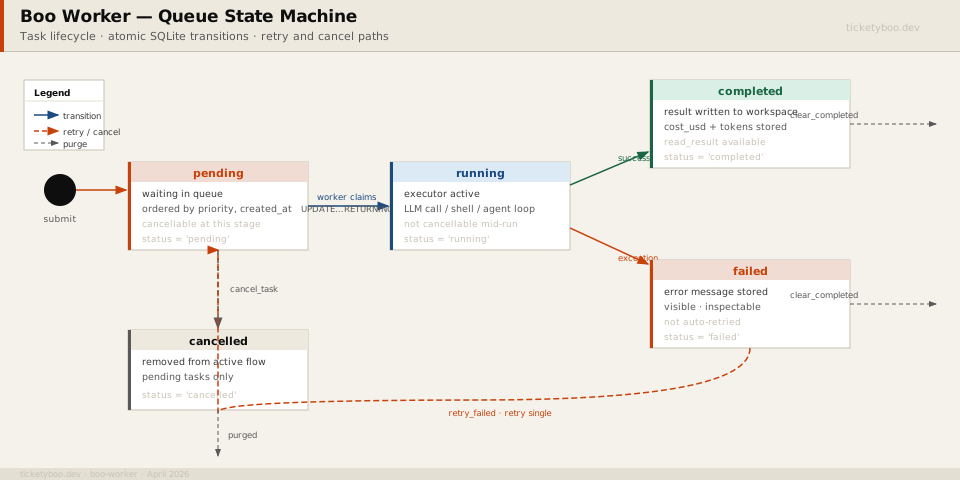
Failed tasks stay visible until you act on them. You can retry a single task, retry all failed tasks at once, or leave them alone and read the error message to understand what went wrong. The queue never silently discards a failure.
Completed tasks accumulate a cost record: input tokens, output tokens, and cost in USD calculated from provider pricing tables or taken directly from the API response. The aggregate is available from the stats endpoint. Useful for getting an honest picture of what a sprint of background generation actually cost.
Model routing
Each task can specify a model explicitly or use "auto", which routes to
a primary provider with fallback logic. In practice: try AWS Bedrock first (cheaper for sustained
volume, stays within a private endpoint if desired), fall back to OpenAI if credentials are
absent or the call fails. Named aliases like "gpt-4o" or "o3-mini"
bypass the routing logic and hit OpenAI directly.
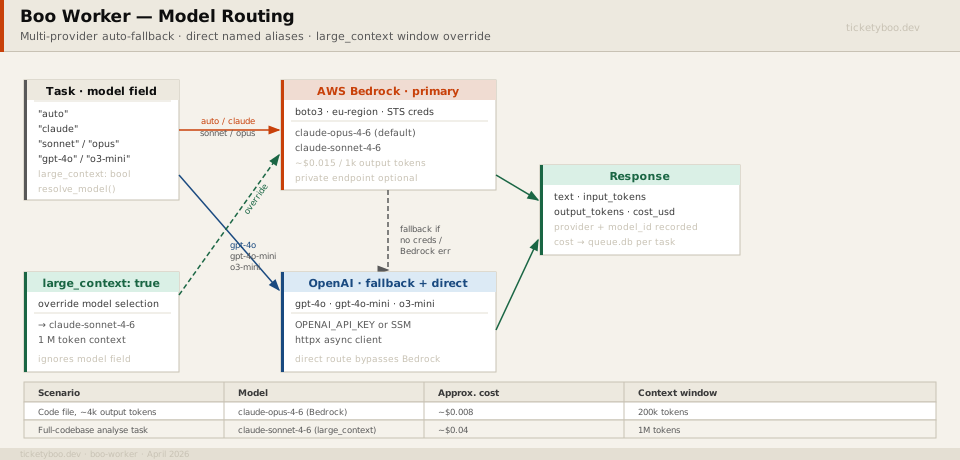
large_context flag is the only override that bypasses the model field — it's designed for tasks where context window size matters more than model preference.
The large_context flag is worth calling out. Some tasks — summarising a large
codebase, writing an article from a long research doc, processing a full test suite for review —
need a model with a wide context window more than they need a specific model family.
Setting the flag forces the worker to route to a model with a 1M-token context window regardless
of what the model field says. The task submitter doesn't need to know which specific
model that is today; the queue configuration tracks it.
Steering injection
.clinerules, CLAUDE.md,
or equivalent) and the worker prepends its contents to every task's system prompt automatically.
Coding standards, naming conventions, architecture constraints — they apply to background work
without the task submitter having to include them in every spec.
This matters more than it sounds. Without it, background tasks produce code that's technically correct but doesn't match the project — wrong import style, wrong error handling pattern, wrong test structure. You end up doing cleanup passes that cost as much time as the generation saved. Steering injection is cheap to set up and pays for itself quickly.
Agent tasks
Most task types are a single LLM call: send a prompt, receive text, parse it, write a file. Agent tasks are different. They run a multi-turn ReAct loop using the Claude CLI as a subprocess, with a sandboxed set of tools: read files, write to a workspace sandbox directory, submit further tasks to the queue. The loop runs for up to twenty turns before timing out.
# Worker loop for agent tasks — simplified
async def execute_agent(task: Task, config: Config) -> ExecutionResult:
    from claude_agent_sdk import query, ClaudeAgentOptions

    options = ClaudeAgentOptions(
        max_turns=20,
        permission_mode="bypassPermissions",  # sandboxed worker, not user-facing
        system_prompt=build_system_prompt(task, config),
    )

    result_text = ""
    async for message in query(prompt=task.spec, options=options):
        if isinstance(message, ResultMessage):
            result_text = message.result

    return ExecutionResult(
        output=result_text,
        cost_usd=message.cost_usd,
        input_tokens=message.input_tokens,
        output_tokens=message.output_tokens,
    )
Agent tasks are useful for work that requires iteration: write a file, run a linter, fix what the linter found, repeat. A single LLM call can't do that; an agent loop can. The tradeoff is cost — a twenty-turn agent run costs significantly more than a single call — so they're worth reserving for tasks that genuinely need the iteration.
The HTTP sidecar
The MCP server communicates over stdio. It's invisible to a browser. If you want to see what's in the queue — what's running, what failed, what it's cost today — you need something that speaks HTTP.
The solution is a thin FastAPI app that reads the same SQLite database. It runs as a persistent background service on a fixed port, managed by launchd (macOS) or systemd (Linux). It's read-only for most endpoints; cancel, retry, and purge are the only write operations, and they only operate on tasks in states where mutation makes sense.
# api.py — the whole thing is ~150 lines
app = FastAPI()
app.add_middleware(CORSMiddleware, allow_origins=["*"])

@app.get("/api/stats")
async def stats():
    return await get_stats(DB_PATH)

@app.get("/api/tasks")
async def tasks(status: str = "all", limit: int = 100):
    return [t.to_dict() for t in await list_tasks(DB_PATH, status)][:limit]

@app.post("/api/tasks/{task_id}/retry")
async def retry(task_id: str):
    task = await get_task(DB_PATH, task_id)
    if not task or task.status != "failed":
        raise HTTPException(404)
    await retry_single(DB_PATH, task_id)
    return {"ok": True}
The worker dashboard wired to this API shows live stats chips (pending / running / done / failed / total cost), a filterable task table with spec snippets, and action buttons for the write operations. It's the kind of visibility that makes the queue feel like infrastructure rather than a black box.
What this is and isn't
SQLite is the right choice for a local-first single-developer queue. It handles hundreds of tasks per day without any tuning. It does not scale horizontally — if you want multiple machines draining the same queue, you need a proper message broker. The design is explicit about this: local-first is a constraint, not an oversight.
Agent tasks are the rough edge. A twenty-turn loop doing file operations in a sandbox is genuinely useful, but the failure modes are weirder than a single LLM call. Tasks can fail partway through, leave partial file writes in the sandbox directory, and produce error messages that require reading the agent's internal turn log to understand. Better tooling for inspecting agent task failures is on the list.
Cost tracking is approximate for agent tasks because multi-turn token counting is messier than a single call. The numbers are directionally right but I wouldn't use them for billing.
None of this is novel in isolation. Task queues are old. LLM wrappers are everywhere. What's less common is an MCP server that is the queue — so the AI submits to it directly, over the same transport it uses for everything else, without any extra integration. That feels like the right shape for local-first AI tooling: instruments that fit into the existing protocol surface rather than adding new ones.
If the articles or tools have been useful, a coffee helps keep things running.
☕ buy me a coffeeticketyboo brings governed AI development to your pull request workflow. 5 governance runs free, one-time welcome grant. No card required.
View pricing Start free →